Android App

A professional metronome and rhythm sequencer with sample-accurate timing, sub-beat subdivisions, and expandable sound libraries.

Ideal for flamenco musicians and dancers, music teachers, and any genre with complex polyrhythms.
Built for Musicians

Professional-grade timing meets intuitive design

Sample-Accurate Timing

All audio timing is defined in samples, not milliseconds. Zero drift, zero jitter — powered by Android AudioTrack in MODE_STREAM.

Sub-Beat Subdivisions

Divide any beat into 1–8 sub-beats. Create triplets, quintuplets, and complex polyrhythms with independent sound assignments.

Custom Sound Library

Upload your own WAV samples or download curated sound packs. Flamenco, drums, percussions — all automatically converted to 48kHz/16-bit.

💾

Patterns & Playlists

Save, import, and share rhythm patterns. Create playlists to chain patterns together for practice sessions or live performances.

🔃

Share & Export

Export patterns as JSON files and share via Gmail, WhatsApp, or any compatible app. Import rhythms from other BeatMaker users.

Fully Configurable

Adjust BPM with slider or tap tempo. Change sounds per beat with a tap, configure sub-beats with a long press. Rename, recolor, and organize your library.

See It in Action

Every feature designed for real musicians

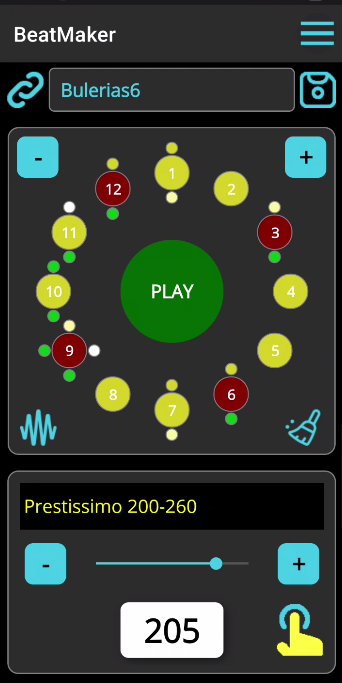
BeatMaker flamenco Bulerias pattern with 12 beats and sub-beat indicators

Intuitive Circular Layout

Beats are arranged in a circle for instant visual feedback. From a simple 4/4 to a 16-beat pattern, see your rhythm come alive with real-time highlighting.

  • Tap a beat to cycle through sounds
  • Long-press to configure sub-beats
  • Color-coded indicators for each sound
  • Sub-beat dots positioned around each beat
  • Add or remove beats with + / - buttons
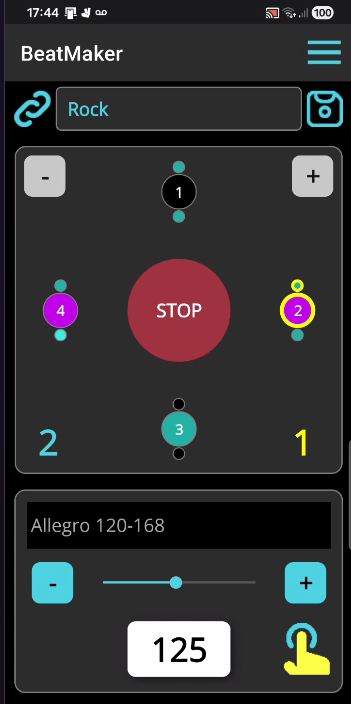
BeatMaker Rock pattern playing at 125 BPM with beat highlighting

Real-Time Playback

Watch the current beat highlight in real time as your pattern plays. Each beat shows its assigned sound with distinct colors for instant recognition.

  • Visual beat highlighting at 60 FPS
  • Tempo marking and BPM slider
  • Tap tempo for quick BPM matching
  • Pattern selector for fast switching
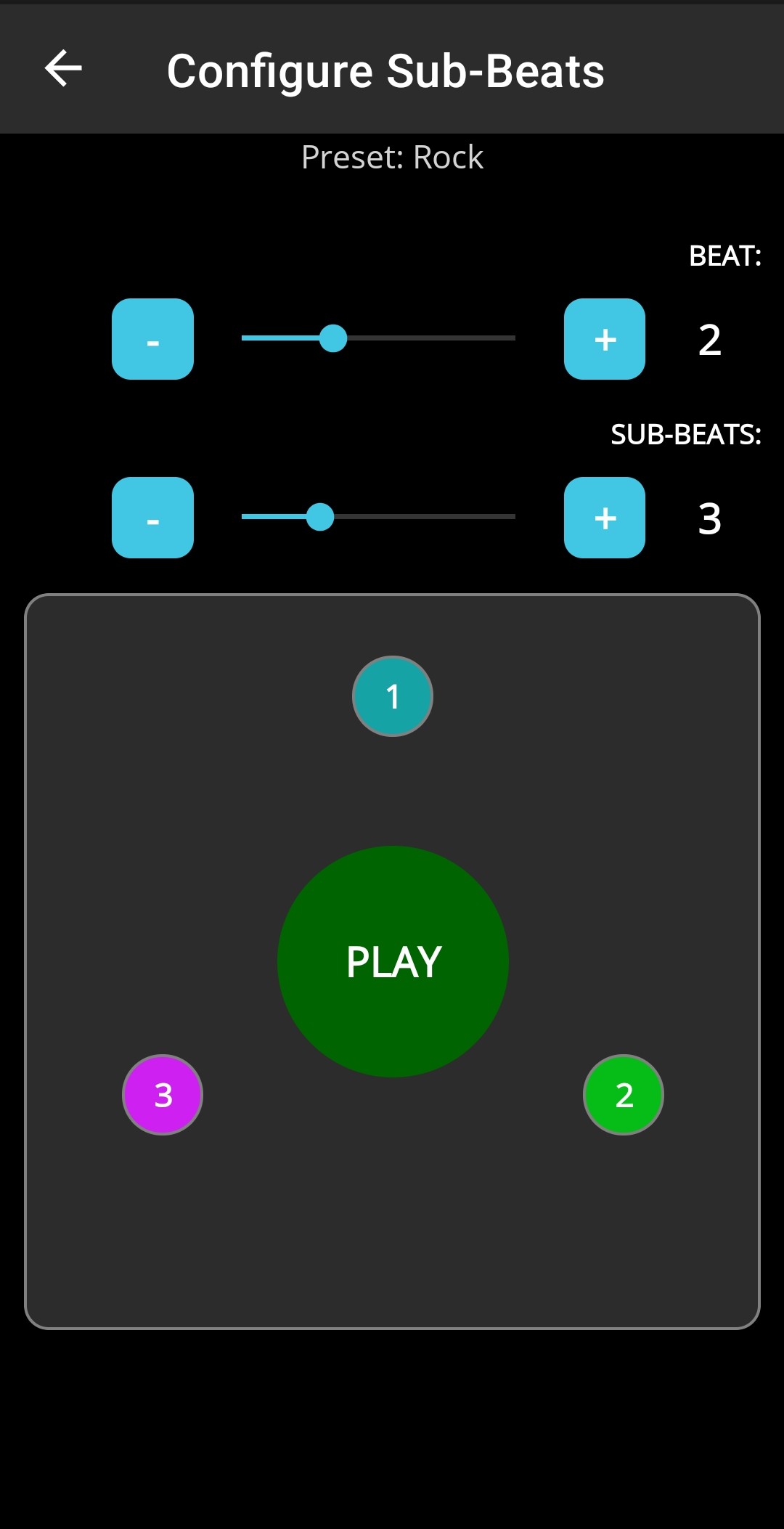
BeatMaker sub-beat configuration screen with triplet subdivision

Sub-Beat Subdivisions

Long-press any beat to open the sub-beat editor. Divide each beat independently into up to 8 sub-beats with their own sound assignments.

  • 1–8 subdivisions per beat
  • Independent sounds per sub-beat
  • Preview subdivisions before saving
  • Triplets, quintuplets, polyrhythms
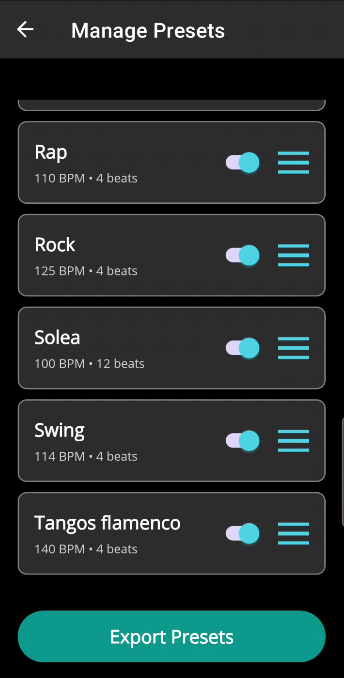
BeatMaker manage patterns screen showing Rap, Rock, Solea, Swing, Tangos

Manage Patterns

Save your rhythm creations as patterns and organize them. Share, rename, delete, or export your entire collection in one tap.

  • Save and load custom patterns
  • Export all patterns as JSON
  • Import patterns from other users
  • Share via Gmail, WhatsApp, and more
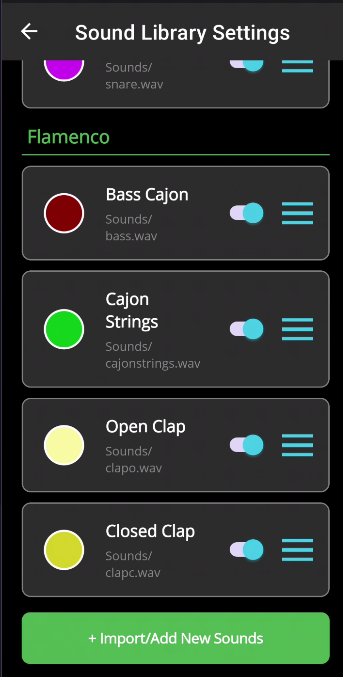
BeatMaker sound library settings with Flamenco group sounds

Custom Sound Library

Browse and manage your sounds organized by groups. Enable or disable sounds for cycling, change colors, rename, or replace WAV files.

  • Grouped display: Default, Flamenco, Drums, Percussions
  • Upload WAV files from your device
  • Download sound packs from the internet
  • Tap color circle to preview any sound
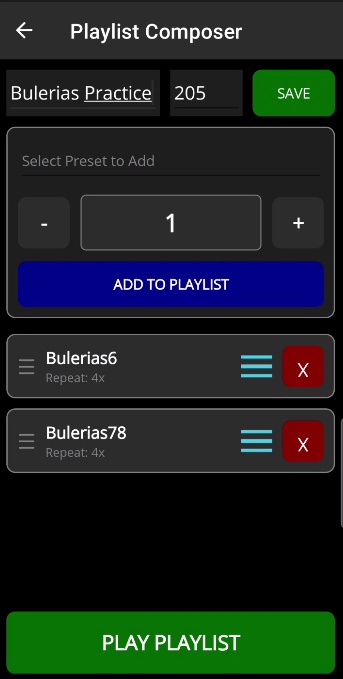
BeatMaker playlist composer with Bulerias patterns

Playlist Composer

Chain multiple patterns into playlists for structured practice sessions. Set repeat counts and BPM for each entry, then hit play.

  • Add patterns with custom repeat counts
  • Normalize BPM or keep original tempos
  • Real-time highlighting during playback

Sound Packs

Expand your library with downloadable packs

Choose Your Version

Start free, upgrade when you need more

Base

Free
  • Full metronome playback
  • Circular beat layout
  • Built-in sound library
  • Adjustable BPM & beat count
  • Save / restore patterns
  • Sub-beat subdivisions
  • Custom sounds upload
  • Playlists
Get Started
RECOMMENDED

Pro

Upgrade
  • Everything in Base
  • Save & share patterns
  • Sub-beat subdivisions (1–8)
  • Upload custom WAV sounds
  • Download sound packs
  • Playlists with tempo control
  • Import / export rhythms
  • Auto-save last session
Upgrade Now

Start Making Beats

Download BeatMaker and take your practice sessions to the next level.

Download on Google Play